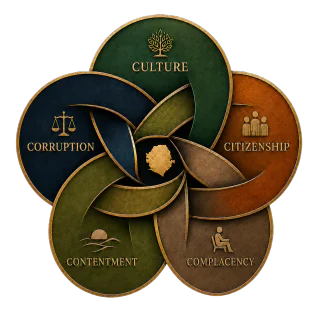
A one-page map of how the five domains interact, including how culture, citizenship, and contentment can help people challenge an inadequate public standard.
In the illustrative water-service case in Chapter 21, households buy water during interruptions. What does the responsible agency still owe every resident?
Culture: Belonging can bring neighbours together to document interruptions. Personal ties can also give a few households privileged access.
Corruption: Entrusted authority is distorted when a connection decides whose repair gets attention. A delay alone cannot establish corruption.
Citizenship: Every resident has an equal claim to an answer, including someone who missed every meeting or knows nobody at the agency.
Contentment: A person can value having enough and still expect reliable public water. Buying water shows how a household copes. It tells us little about what it accepts.
Complacency: An inadequate service can become the standard people come to expect. Silence alone is ambiguous: fear, fatigue or the cost of speaking can also explain it.
What would count as change?
Ask who could act, who bore the cost and what evidence might change your reading.
Private relief: One household gets a delivery through a contact. Who still has to call in a favour?
A public response: The agency publishes a repair timetable. Can any resident check progress and get an answer when a date slips?
Preference center
Privacy choices
Optional categories begin turned off. You can change them at any time. Turning off embedded media removes active Facebook and YouTube players from this page, but it cannot withdraw information already shared with an external provider.
Optional app icon
Use Chrome’s current app or shortcut command.
You do not need to install anything for offline reading. Use the one-tap offline setup below. Add an icon only if you want the site on your home screen or desktop. If this page is inside ChatGPT, Facebook, or email, first choose Open in browser.
Android · Chrome
Create a shortcut
Tap Chrome’s three-dot menu.
Choose Add to home screen, then Create shortcut.
If Chrome shows Install app instead, use that.
Computer · Chrome
Install the page as an app
Open Chrome’s three-dot menu.
Choose Cast, save, and share.
Choose Install page as app or Create shortcut.
iPhone or iPad
Use Safari
Open this page in Safari.
Tap Share, then Add to Home Screen.
Tap Add.
If Chrome does not show either command, the website cannot reveal it or force the native prompt. The offline setup still works and can be opened from a normal bookmark.